
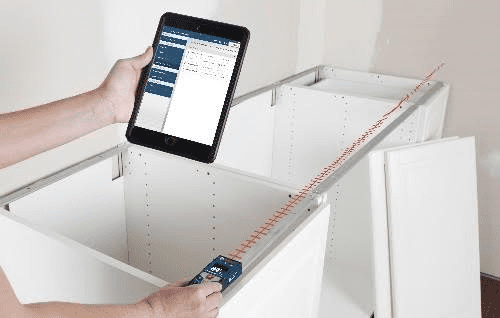
Bosch recently introduced the Bosch MeasureOn App for architects, painters, floorers, electricians, and any other tradesman who needs to document and manage site measurements and floor plans electronically. Essentially, it shifts toward full-blown electronic project management.
The app, available for iOS and Android devices, can be used in combination with the GLM 100 C Professional and GLM 50 C Professional laser measures and combines all the functions of the previous GLM measure & document and GLM floor plan apps.
“Bosch MeasureOn offers BLAZE GLM 50 C and GLM 100 C users a powerful program that closes the loop on end-to-end project management. Our goal is to provide users with real-world tools that make their jobs more efficient and precise. With MeasureOn, we’ve also made users’ jobs easier – putting more time back in their day.”
– Stephanie Dahl, Measuring Tools Product Manager
Our Take
Sometimes helpful tools aren’t made out of metal and composite resin but out of bytes and pixels. That might be the case with the brand new (free!) Bosch MeasureOn App with its ability store photos, floor plans, project measurements, and notes electronically on phones and tablets.
For some users, it’s a step up from the bulky binders or, worse yet, on scraps of paper with your own shorthand that you can’t even decipher. Perhaps more helpful is the MeasureOn app’s compatibility with some of Bosch’s laser measurement tools.
MeasureOn 101
From the Bosch MeasureOn playlist on YouTube, you can get a good sense of the app’s interface and functionality. To start a project, either import customer information from your contacts or enter new information.
The app then opens up for you to use any of its features to create floorplans, measure dimensions, take photos, notes, and so on. You can even overlay take a photo and overlay dimensions on it. All of your projects are available at the touch of the screen in the main overview page.
You can export any information to clients or back to the office with a PDF and spreadsheet (note: that means your device must have internet connectivity). Not a bad way to stay organized and work more efficiently, if you ask us.
Cautiously Optimistic
One word of caution, however. You might already keep all project information in one place without a backup. That’s okay for paper documents, but that smartphone you or tablet you work with is extremely vulnerable to damage.
We love the ability to export information and it’s certainly no knock against Bosch’s app which looks quite robust, but backing up (or duplicating, at least) the information is a manual process and there’s no cloud-based storage. All of your project information is only stored locally (on your device) unless you purposefully back it up by sending it via email. That’s a bit of risky proposition.
Realistically, there’s a learning curve and some Pros might not be comfortable managing project electronically at first. By all means, try the app and tell us what you think. Just form a habit of sending all project information to your own email and don’t keep critical information on your device as your only copy.